Understand letters from school, the bank and the upravna enota without a translator
Build Slovene vocabulary out of what you already read. The Chrome extension translates the word you select right on the page, and the app brings it back for review on a schedule until it stays in your memory.
How it works
Select a word in Chrome
You read the news, a letter from school or a contract right in your browser. A word you do not know: select it, right click, pick Wordloader. The translation, the definition and the stress appear on the same page. The “Learn” button sends the word to the app together with the sentence you met it in.
Learn in small sets
The app never dumps a list of a hundred words on you. It builds a set: your own words from the browser first, then the most common words of the language from the shared dictionary. A set holds five words by default, and you can make it larger or smaller in settings. One set a day, and you always know what to learn today.
Review seven times in a month
The set comes back on its own: right after you learn it, before bed, the next day, then after 3, 7, 14 and 30 days. Seven reviews spread over a month move a word from “seen it somewhere” to something you recall without effort.
Why this beats a translator
Run the whole text through AI
You will understand the letter in a second and remember none of its words an hour later. The machine did the understanding, not you, and next time it starts over.
Look the word up in a dictionary
The sentence makes sense, but the word is not kept anywhere. Tomorrow you meet it again and go back to the dictionary. People look up the same word for months.
Open it in Wordloader
Translating and remembering become one action. The word is already queued for review: you write nothing down, the app brings it back itself.
You learn the words you need every day
Words come from two places. The first is your own reading: everything you marked in letters, news and documents. The second is the frequency list of the language: when your own words run low, the app adds the next most common ones.
We measured against a corpus of living Slovene how much of a text the most common words cover:
The first thousand words give you more than the next four thousand. That is why the app takes you from the most common words to the rare ones: early on, every word you learn is worth a dozen random ones.
One click, without leaving the page
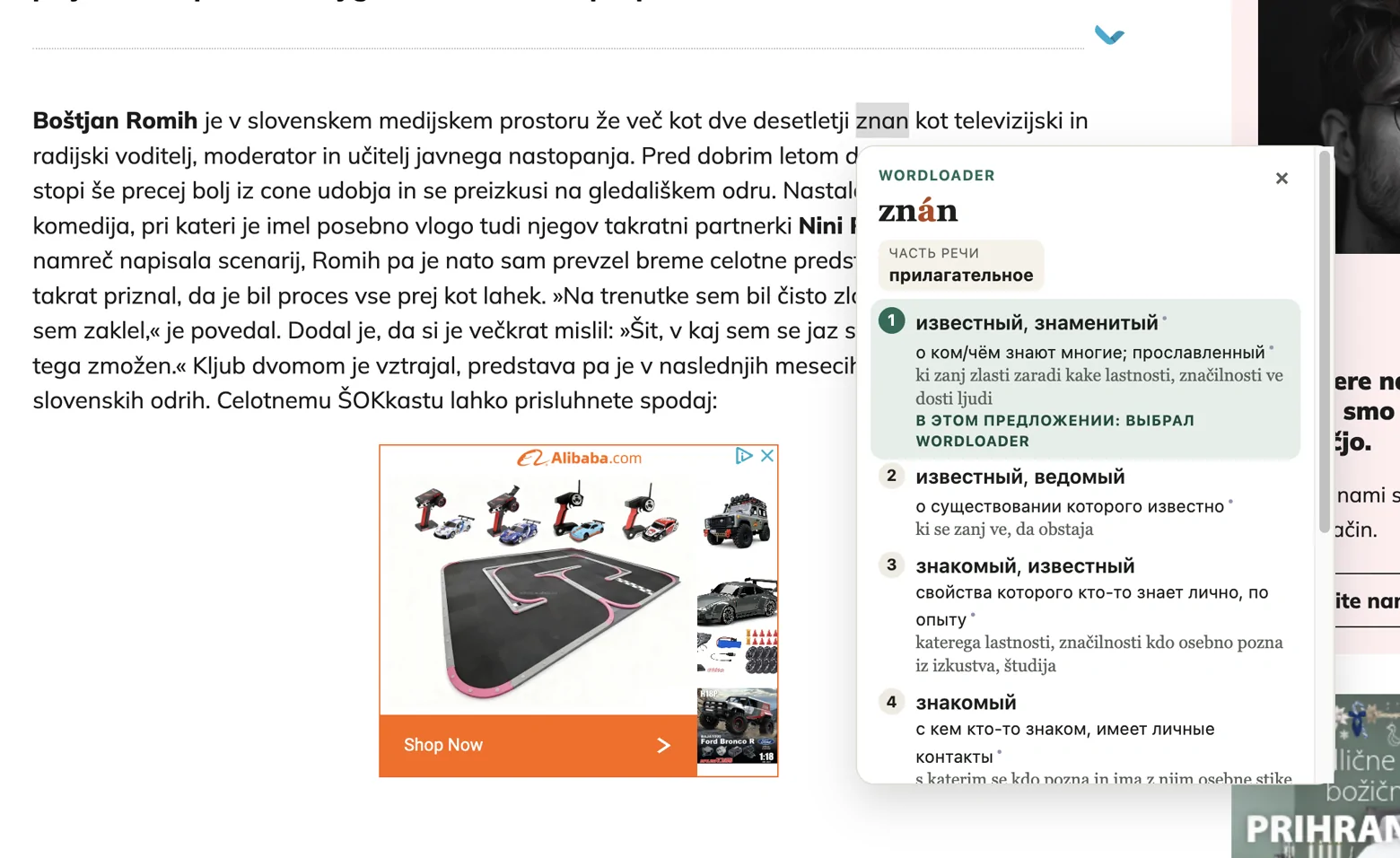
- 1Select the word you do not know, in a letter or on a site.
- 2Right click and pick “Wordloader: перевести”.
- 3See the dictionary form with stress, the grammar and every sense with its translation.
- 4Press “Learn”, and the word joins the next set.
The extension is installed by hand, it is not in the Chrome store yet: how to install it in a minute. The app works without it too: you can add words by hand or take them from the frequency list.
The method that makes a word stay
The app runs on spaced repetition. A word comes back to you not every single day, but at the moment you are about to forget it: that is when memory holds on to it longest. Each time the gap grows, until the word becomes one you no longer think about.
Words are learned in sets: five words by default, and the size is yours to change in settings. A set returns the same day, before bed, then after one, three, seven, fourteen and thirty days. A forgotten word does not drag the whole set back: it moves down one step and shows up sooner than the rest.
Translations from official dictionaries, not from guesswork
Every word is assembled from the real dictionaries of the University of Ljubljana and the Fran Ramovš Institute of the Slovenian Language:
Sloleks 3.1
Stress, part of speech, every form and how common the word is.
SSKJ²
The standard dictionary of Slovene: senses and definitions.
eSSKJ
Newer words that SSKJ² does not have yet.
Pretnar dictionary
Russian translations, sorted by sense of the word.
Every word shows where its data came from. If a word is in none of the dictionaries, the app says so instead of inventing a translation. Anything suggested by AI is marked with a dot, so you always tell a dictionary entry from a guess.
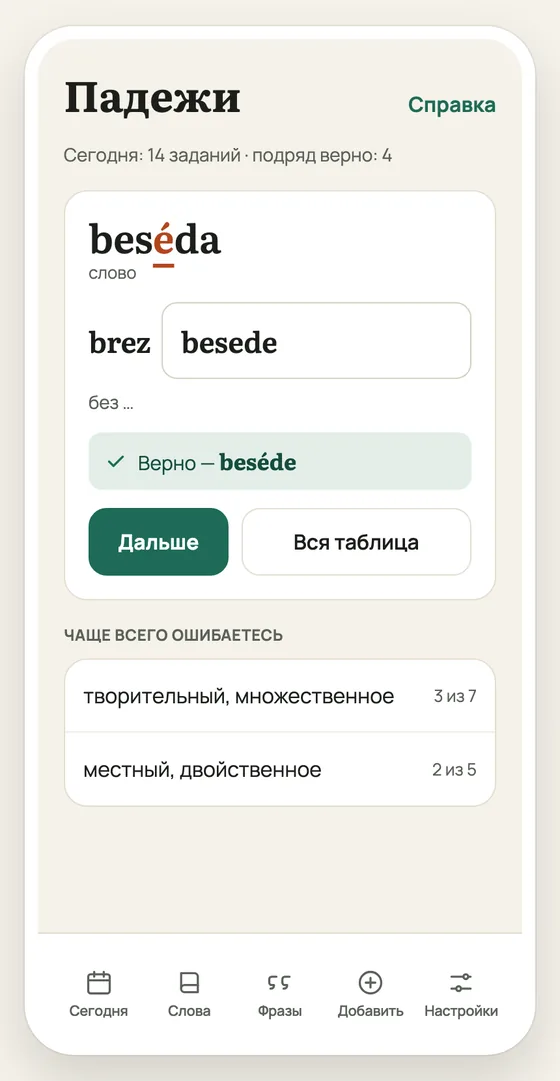
Cases drilled on your own words
Why I built this
I live in Slovenia and I am learning the language: I took courses and read textbooks. They helped, but my vocabulary grew fastest when I met a word in real life and used it straight away.
Something else got in the way. I would meet a new word, translate it and forget it within a week. Then it would turn up again, and back to the dictionary I went. So I started writing such words on paper cards and reviewing them at growing intervals. It worked: the words stayed.
But paper cards are awkward to carry and hard to keep up with once there are many of them. So I moved the same method into an app and added what paper cannot do: translation right in the browser and dictionary data from official sources.
Aleksei, the author of Wordloader
Short answers
- What does it cost?
- Nothing for now, it is in beta. I will warn you before a subscription appears.
- Will it teach me to speak?
- No. The app builds the vocabulary you need to read and to follow speech. Speaking is learned by speaking, though without words there is no conversation either.
- Will it help with the residence permit exam?
- For the reading and listening parts, yes: those rest on how many words you know. The app does not drill the exam format itself.
- Is it suitable for a beginner?
- Yes. Words run from the most common to the rare, so from scratch you start with the ones you meet every day. There are no grammar explanations here: this is a drill for words and cases, not a textbook.
- Do I need to install anything?
- Not the app itself, it opens in a browser. On a phone you can add it to the home screen and it behaves like a normal app, even offline. The Chrome extension is separate and optional: without it you add words by hand or take them from the frequency list.
- What happens to my data?
- It is kept on servers in the European Union, with no ads and no third-party trackers. Details in the privacy policy.
Your first five words today
A set holds five words by default and takes about ten minutes. Tomorrow the app reminds you about them itself.
Start for freeEmail and password, a minute to sign up. No card needed